Going beyond: Finestra 0.4, X11 applications and a month of hardening
Eight releases separate the ARM build from Finestra 0.4.0. Firefox, Thunderbird and X11 programs now run in a window; sessions survive a lost connection and a slow one; and the desktop is easier to operate.
Finestra 0.3.8, released on 25 September, added the 64-bit ARM build. Eight releases followed in the four weeks after it, ending with 0.4.0 on 25 October. This post summarises what changed in that period for someone who installed one of the earlier versions, or who looked at Finestra then and decided it did not yet cover their case.
When a project matures, more needs arise. This month’s changes include better support for unstable connections, more desktop applications running (yes, including X11), and a better operation model.
Better support on slow or unreliable networks
Most of the work in October concerned what happens when the connection between the browser and the server is slow, or drops.
A slow connection no longer freezes the desktop, and is no longer cut off. Each window’s picture was sent to the browser as one message, and the terminal, the keyboard and the server’s own keepalive waited behind it. On a slow link the keepalive gave up and the server closed the connection. Pictures now travel in small pieces with everything else allowed between them, frames don’t queue up, and a slow connection receiving data is not mistaken for a dead one.
A slow connection is shown the newest picture. While a frame was on its way, every further redraw queued behind it. Now one frame per window is in flight at a time, and what the application draws meanwhile is sent once, when the browser has the last one.
What you leave running stays running. A terminal or a native application whose browser went away is kept until its window is closed or the service restarts, as on a desktop at a physical machine. A reconnect, a reload, or a different browser the next day picks it up where it was.
More applications run
Firefox and Thunderbird. Both draw their entire interface inside a Wayland subsurface, which the compositor did not support. Subsurfaces now reach the browser as their own canvases, and both applications work, including their menus and dialogs.
Scaled screens. On a display at 150%, 166% or 200%, applications were asked for twice their size and clicks landed in the wrong place. Sizes and pointer positions now use the application’s own coordinates, and the window is painted at the screen’s density.
Open and Save dialogs in confined applications. A snap asks the desktop portal for its file dialog, and a headless server has no portal, so the dialog never appeared. The server now answers the file-chooser portal itself. The dialog is drawn by the desktop over the application’s window and browses the server’s files, for opening, saving, multiple selection and folder choice. This works on a server with no desktop of its own and on a workstation whose own desktop portal is running.
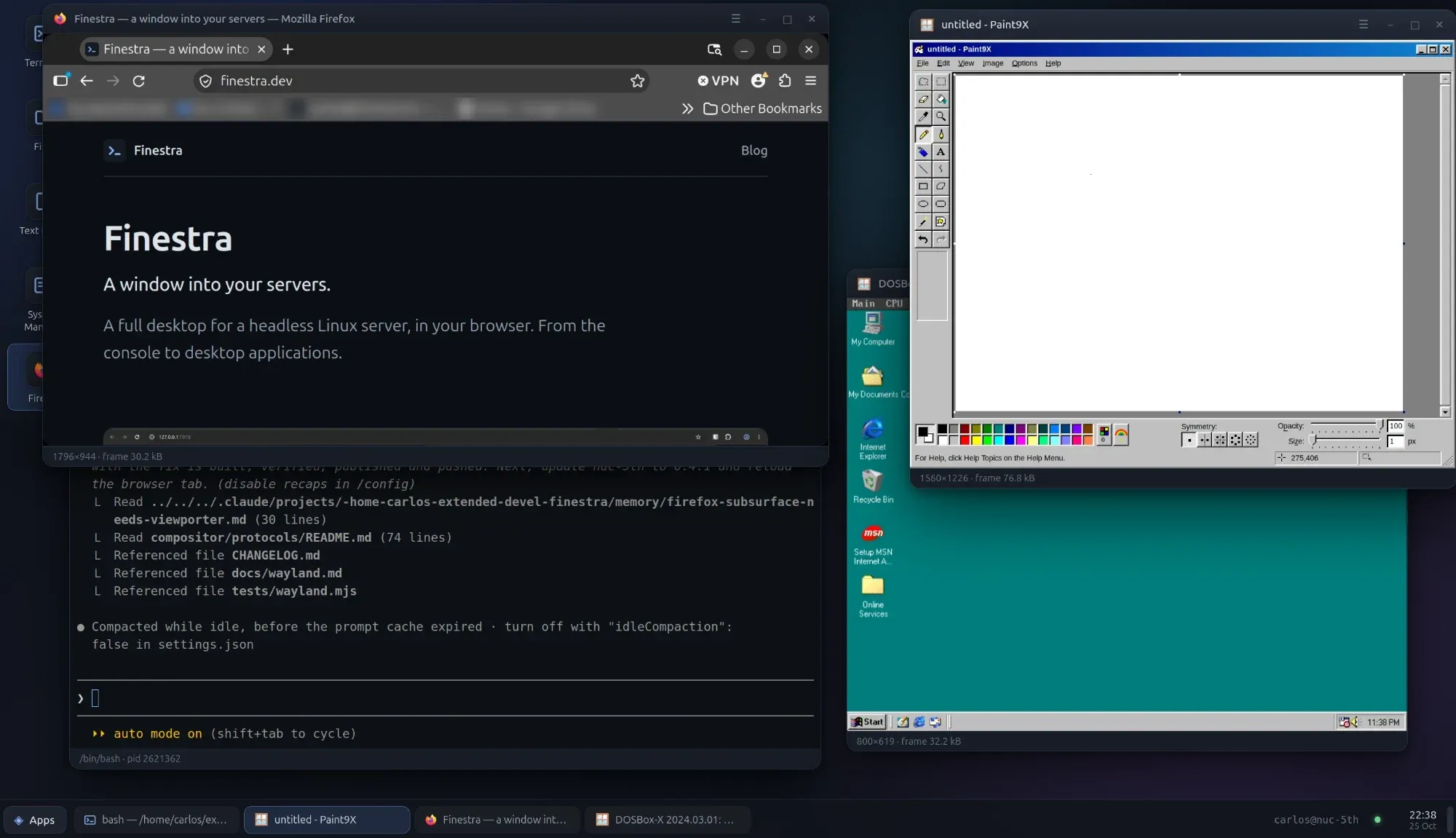
X11 applications. This is the biggest change in 0.4.0. Programs that speak X11 rather than Wayland now open in a window like any other: DOSBox-X and the emulators and games built on SDL, anything written in Tk, Java and Wine programs, and the older X tools.
X11 support needs the Xwayland program on the server. The installer
reports whether it is present and prints the package name for the system’s
package manager.
Pointer capture is not there yet, so a game or an emulator that grabs the mouse to read its movement will see it drift. That is the next item on the roadmap for this area.
Smaller corrections in the same area. A drop-down opened from a dialog was drawn where it could not be clicked; a helper process that exited with its dialog still up, such as zenity asking a question, left that dialog behind as the application’s window; and an application that replaces its first window with a second one, as LibreOffice does after its splash screen, was closed before the second window appeared. All three are fixed.
Operating it
The access token can be changed from Settings. Settings → Access lists every connected desktop and can issue a new token. The old token stops working at once. Desktops connected at that moment receive the new one and stay in. The token is no longer kept in the page, where any script could read it.
Clearer answers when something does not start. An application already running on the machine’s own screen is named with its process id, instead of being reported as having exited without a window. An application that quits from its own menu is reported as closed, not as having failed to start.
The process manager gained a way back from a filtered view, a detail panel that closes with Escape, and buttons that say what Terminate and Kill do.
A terminal no longer inherits the service’s settings. A shell opened in the desktop could see how the service was configured, and anything started from it that reads those variables adopted them. Shells and applications now start without them.
Installing and upgrading
The one-line installer is unchanged and picks the right build for the machine:
curl -fsSL https://finestra.dev/get.sh | sudo bashAn existing installation upgrades in place with update.sh and the new
tarball, and rolls back with update.sh --rollback if the new version does
not come up. The full list of changes, release by release, is in the
project’s CHANGELOG.md.