Close the tab, the shell keeps running
Finestra 0.3.7 lets a terminal outlive its browser. Shut the laptop, come back tomorrow, and the build is still going — with nothing to type and no tmux to remember.
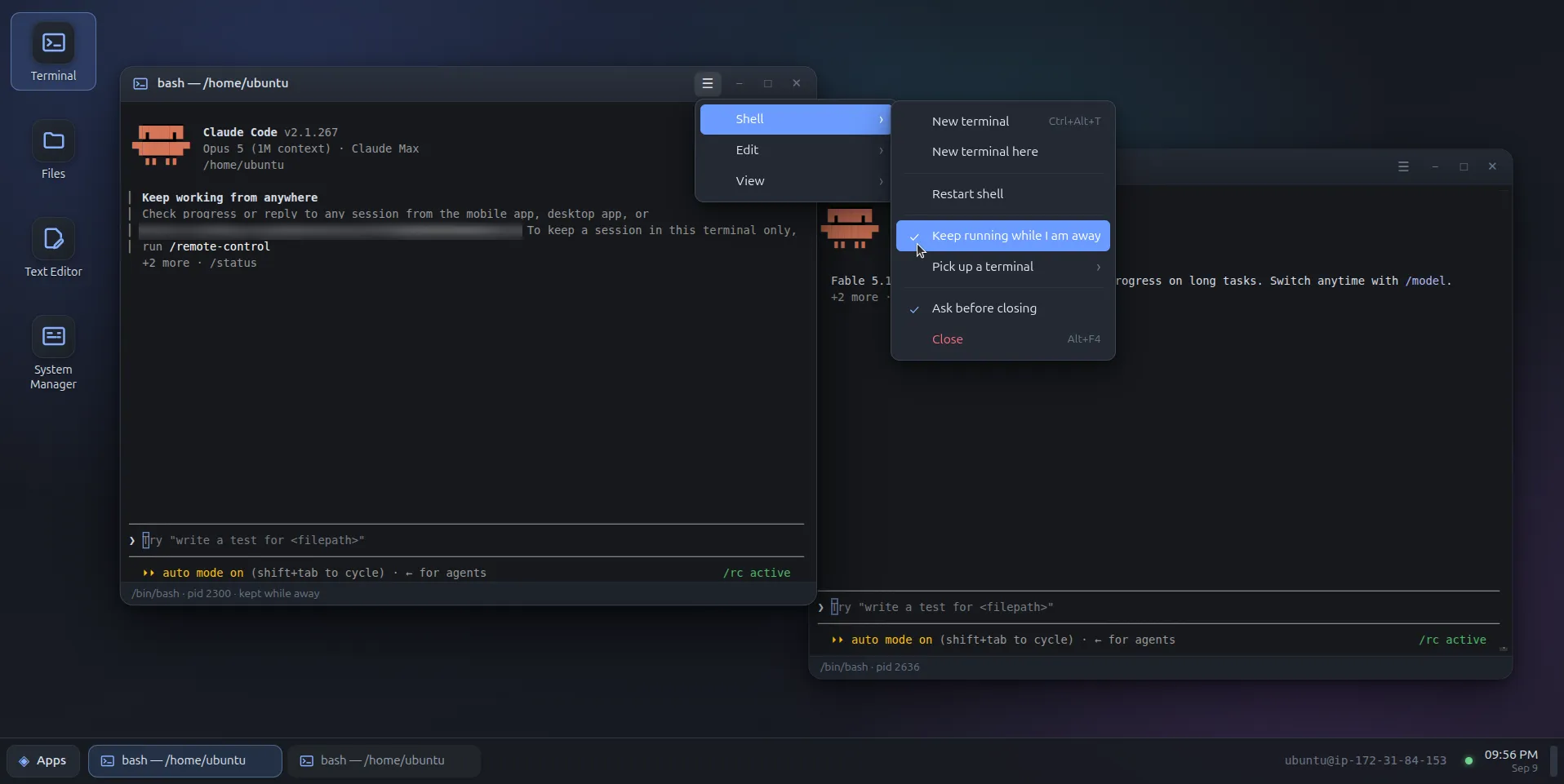
Until 0.3.7, losing the connection lost the work. Close the tab, shut the lid,
drop off the VPN — every disconnect hung the shell up and killed whatever was
in it, exactly the way a dropped SSH session does. If you wanted a build to
survive that, you had to have remembered tmux before you started it.
Now the shell keeps running, and the terminal that comes back picks it up where it was. This not only helps to save headaches with flaky SSH/VPN connections, but also enables long sessions to be left running for picking them up later (Yes, I’m looking at you Claude).
What happens when the socket drops
The server keeps the shell alive and banks its output. When a terminal comes back it is matched to that shell by id, and what it gets depends on where it came from:
- The same page reconnecting is shown only what it missed.
- A reload, or a browser that has never seen this shell, is shown the last megabyte.
Full-screen programs — vim, htop, anything holding the alternate screen —
repaint on the resize that follows, so they arrive drawn rather than smeared.
The effect is what tmux gives you, minus the part where you have to have
thought of it in advance.
What still ends a shell
The same three things as before, and it is worth being precise about them:
- Closing its window. Closing is still closing. Losing a connection is not.
exit, as always.- Nobody coming back. An unclaimed shell gets an hour, then the
SIGHUPa closed window would have sent.WD_TERMINAL_GRACEsets that in seconds, and0restores the old hang-up-immediately behaviour if you preferred it.
And one that is not new but matters more now that shells are expected to
persist: restarting the service ends every shell. The terminal is a child
of the server, so an upgrade takes them all with it. Only a tmux or screen
started inside the shell survives that.
For the job that outlasts the hour
An hour is the right default for a dropped connection and the wrong one for a model training overnight. Shell → Keep running while I am away marks a shell to wait as long as it takes. The status bar says kept while away, and the mark belongs to the shell rather than the window that set it.
Come back the next day, from any browser: at startup, after the saved session is restored, every shell on the server that no window is showing gets a terminal opened onto it. Shell → Pick up a terminal lists the rest — what each one is running, how long it has been alone, and whether another window already has it.
If two windows end up on the same shell the newest wins, the way
tmux attach -d does, and the displaced one is told it was displaced instead
of left wondering why it went quiet.
That list is open to any connection, which is deliberate rather than an oversight: it exists precisely for the browser that has never seen the shell, and reaching this server at all already means holding the account those shells run as.
Getting it
Same one-liner; it takes an existing install over and keeps your token, settings and who-it-runs-as answer:
curl -fsSL https://finestra.dev/get.sh | sudo bashOr in place, from a tarball you already have:
sudo /opt/finestra/current/update.sh <tarball>
sudo /opt/finestra/current/update.sh --rollback   # if it goes badly
One thing to know before you upgrade: 0.3.7 also moves the terminal to xterm.js 6. That should be invisible — if something renders differently than it did in 0.3.6, that is the change to suspect.